“Can you confirm that our production container images have valid SBOMs, signatures, and attestations?”
Should have been routine. Quick check, thumbs up, move on. Instead I spent the next hour copying digests between terminal windows, mentally mapping relationships between image indexes and their referrers, and wondering why verifying a container’s supply chain felt like archaeology.
So I built OCI Image Explorer – an open-source tool that shows everything attached to a container image in one view. Try it at ociexplorer.dev.
But before the solution, let me show you the problem. Take a real image – ghcr.io/hkolvenbach/oci-explorer:latest – and try to answer one question: what supply chain artifacts does this image have, and are they valid?
The Gauntlet: 7 Tools, 15+ Commands, Still No Full Picture Link to heading
What’s in the image index? Link to heading
Let’s start with the structure. crane can show us the manifest:
$ crane manifest ghcr.io/hkolvenbach/oci-explorer:latest
{
  "schemaVersion": 2,
  "mediaType": "application/vnd.oci.image.index.v1+json",
  "manifests": [
    {
      "digest": "sha256:66c921b5bcd7d72d...",
      "platform": { "architecture": "amd64", "os": "linux" }
    },
    {
      "digest": "sha256:21342d06e1d91019...",
      "platform": { "architecture": "arm64", "os": "linux" }
    },
    {
      "digest": "sha256:777e09c7f837ca46...",
      "annotations": {
        "vnd.docker.reference.type": "attestation-manifest"
      },
      "platform": { "architecture": "unknown", "os": "unknown" }
    },
    {
      "digest": "sha256:deb9c82de18fee04...",
      "annotations": {
        "vnd.docker.reference.type": "attestation-manifest"
      },
      "platform": { "architecture": "unknown", "os": "unknown" }
    }
  ]
}
Four manifests. Two real platforms (linux/amd64, linux/arm64). Two unknown/unknown – those are attestation manifests that Docker BuildKit uses to embed SLSA provenance and SBOMs. But crane doesn’t tell you that. You have to read the annotations, recognize the attestation-manifest type, and mentally cross-reference which attestation belongs to which platform by matching digests.
So now I know the image is multi-arch with embedded attestations. But what kind? Are there signatures? SBOMs? OCI referrers?
Are there OCI referrers? Link to heading
OCI 1.1 introduced the Referrers API – a standard way to discover artifacts attached to an image. Let’s check with oras:
$ oras discover ghcr.io/hkolvenbach/oci-explorer:latest
ghcr.io/hkolvenbach/oci-explorer@sha256:8f951e925add...
└── application/vnd.dev.sigstore.bundle.v0.3+json
    └── sha256:325a152d4a39...
One referrer: a Sigstore bundle. But what’s in it? Is it a signature? A provenance attestation? oras shows the artifact type but not the content. Switch to JSON output and you’ll find annotations revealing it’s a SLSA provenance attestation wrapped in a Sigstore bundle – but only if you know to look there.
And this only shows referrers for the image index digest. Per-platform referrers require separate queries with each platform digest.
What does cosign see? Link to heading
$ cosign tree ghcr.io/hkolvenbach/oci-explorer:latest
📦 Supply Chain Security Related artifacts for an image: ghcr.io/hkolvenbach/oci-explorer:latest
└── 🔐 Signatures: ...sha256-a06d68f5...sig
   └── 🍒 sha256:07cff4c0cecc...
└── 🔗 https://slsa.dev/provenance/v1 artifacts via OCI referrer
   └── 🍒 sha256:c0b209796389...
Best output so far. cosign tree shows signatures, attestations, and OCI referrers in one view. But it operates at the index level – you can’t see which platform a signature covers. And it lists artifacts without showing content. To verify, more commands.
Verify the signature Link to heading
$ cosign verify \
    --certificate-identity-regexp="https://github.com/hkolvenbach/oci-explorer" \
    --certificate-oidc-issuer="https://token.actions.githubusercontent.com" \
    ghcr.io/hkolvenbach/oci-explorer:latest

Verification for ghcr.io/hkolvenbach/oci-explorer:latest --
The following checks were performed on each of these signatures:
  - The cosign claims were validated
  - Existence of the claims in the transparency log was verified offline
  - The code-signing certificate was verified using trusted certificate authority certificates
The signature is valid. But you had to know the exact --certificate-identity-regexp and --certificate-oidc-issuer flags. Get them wrong and the verification fails with a non-obvious error.
Verify attestations – and watch out for the type trap Link to heading
$ cosign verify-attestation --type slsaprovenance \
    --certificate-identity-regexp="https://github.com/hkolvenbach/oci-explorer" \
    --certificate-oidc-issuer="https://token.actions.githubusercontent.com" \
    ghcr.io/hkolvenbach/oci-explorer:latest

Error: none of the attestations matched the predicate type: slsaprovenance,
found: https://slsa.dev/provenance/v1
--type slsaprovenance is a shorthand that maps to an older predicate URI. The error message tells you the actual type (https://slsa.dev/provenance/v1), but it’s not obvious that you should pass the full URI as the --type value. One more thing to know, one more flag to get right.
The VEX interoperability gap Link to heading
VEX (Vulnerability Exploitability eXchange) is one of the most important yet underappreciated pieces of the supply chain puzzle. An SBOM tells you what components are in your image. A vulnerability scanner tells you which have known CVEs. But neither tells you whether those CVEs actually affect your application. That’s what VEX does – it’s a “negative security advisory” that says “yes, this CVE exists in a dependency, but it’s not reachable in this context.”
Our release pipeline attaches an OpenVEX document generated from govulncheck output. Let’s try to find it.
cosign verify-attestation –type openvex: Can’t find it. The shorthand maps to a specific predicate URI, but the OpenVEX attestation uses https://openvex.dev/ns – which doesn’t match.
trivy image –vex oci: “No VEX attestations found” – even though we just confirmed one exists. Trivy looks for attestations via OCI referrers at the per-platform manifest level, but ours is attached at the image index level via cosign’s tag scheme. Different attachment mechanisms, different discovery paths, zero interoperability.
vexctl filter: Requires scanner output (SARIF format) as input. There’s no vexctl inspect command to simply ask “what VEX data is attached to this image?”
To actually see the VEX data, you have to know cosign’s .att tag naming convention, fetch the attestation manifest, identify the right layer by predicate type, download the blob, decode the DSSE envelope, base64-decode the payload, and parse the inner JSON. Six steps deep for data that’s supposed to be discoverable.
The interoperability gap is real. Even Chainguard – the company behind both cosign and vexctl – ships images where trivy --vex oci reports “no VEX attestations found”, while cosign tree sees them just fine.
The scorecard Link to heading
Here’s what each tool told us, and what it didn’t:
| Question | crane | oras | cosign | trivy | dive | vexctl |
|---|---|---|---|---|---|---|
| Platforms available? | JSON only | No | No | No | No | No |
| Layers and config? | JSON only | No | No | No | Interactive | No |
| OCI referrers? | No | Tree + JSON | cosign tree | No | No | No |
| Signatures valid? | No | No | Manual flags | No | No | No |
| SLSA provenance? | No | No | Type gotcha | No | No | No |
| SBOM content? | No | No | No | No | No | No |
| VEX data readable? | No | No | No | No | No | No |
| Vulnerabilities? | No | No | No | Yes | No | No |
| Multi-platform view? | One at a time | Index only | Index only | One at a time | One at a time | No |
To get a complete picture of this single image, we ran 15+ commands across 6 tools, copy-pasted digests between them, decoded base64 payloads, worked around type-matching gotchas, and still couldn’t see everything in one place.
Enter OCI Image Explorer Link to heading
Enter an image reference. Hit Inspect. Done.
One view, full picture Link to heading
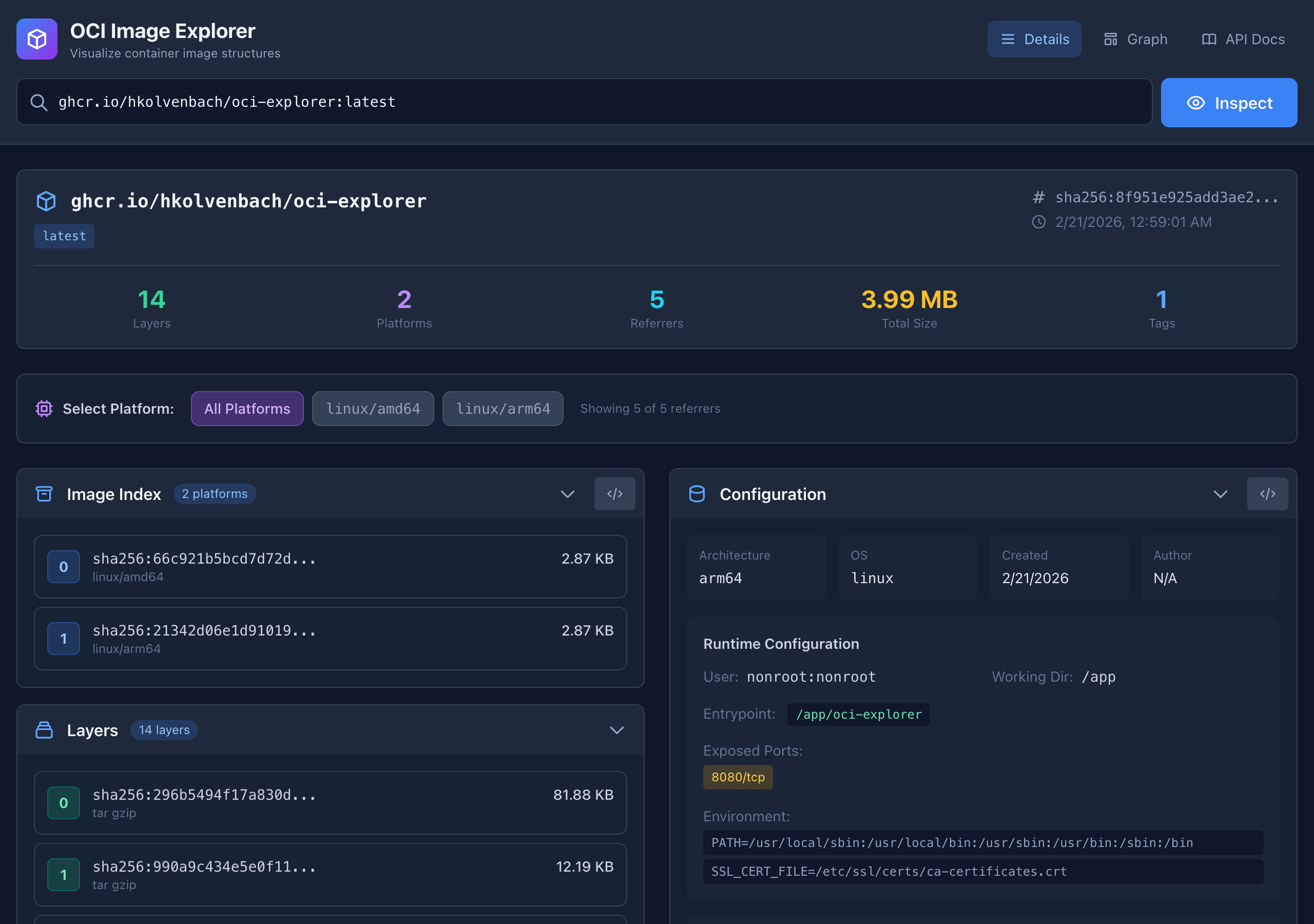
Image index with all platform variants, per-platform layers with sizes and media types, runtime configuration (entrypoint, env vars, user, working directory), build history mapping every Dockerfile instruction to its layer. Everything the six tools above show separately, in one page.
Supply chain artifacts Link to heading
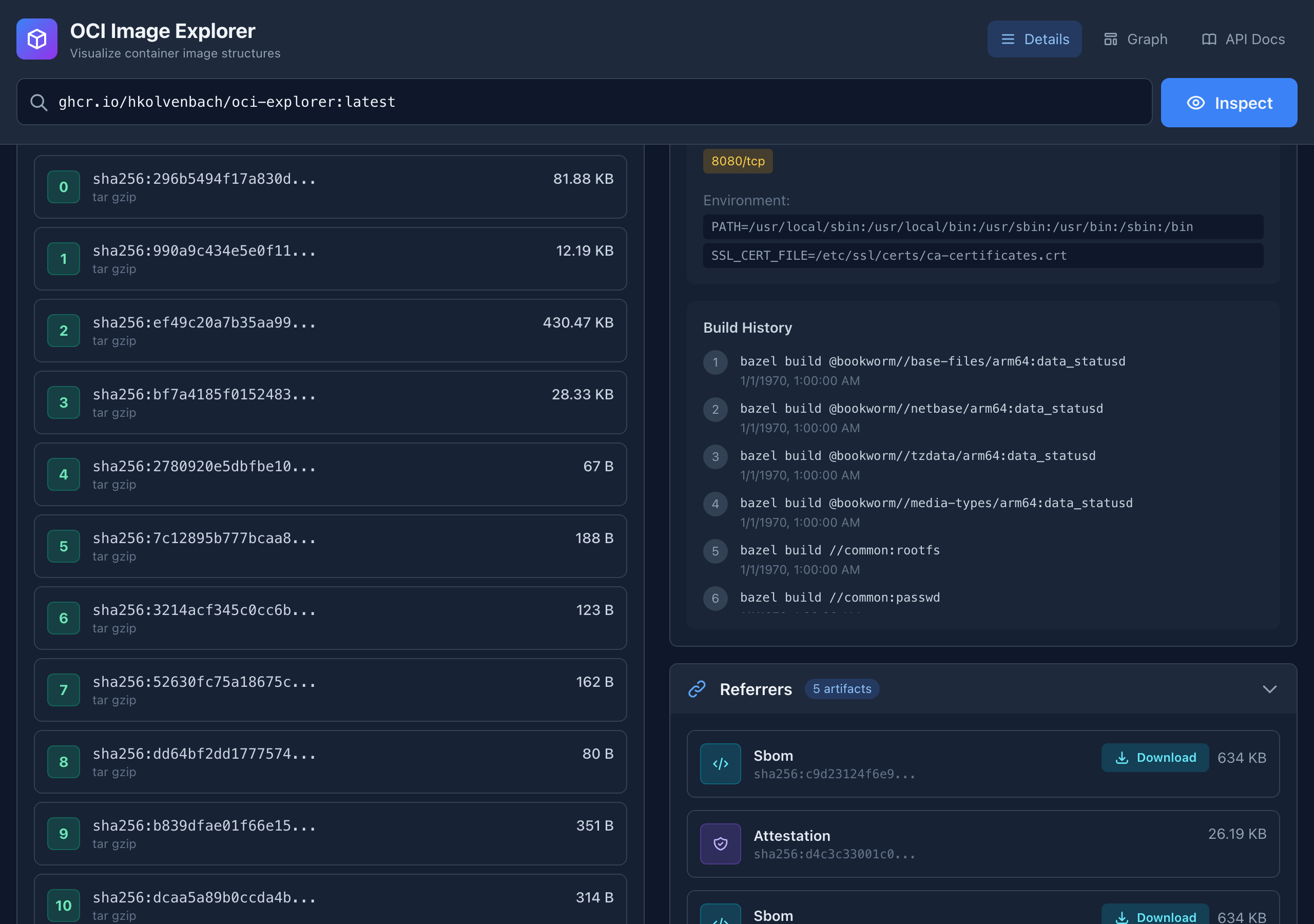
All supply chain artifacts discovered automatically via the OCI Referrers API: signatures (cosign keyless, Notary), SBOMs (SPDX, CycloneDX) with download links, attestations (SLSA Provenance, In-Toto), vulnerability scans. Classified by type, linked to platform. No digest copy-pasting, no type guessing, no tool switching.
Graph view Link to heading
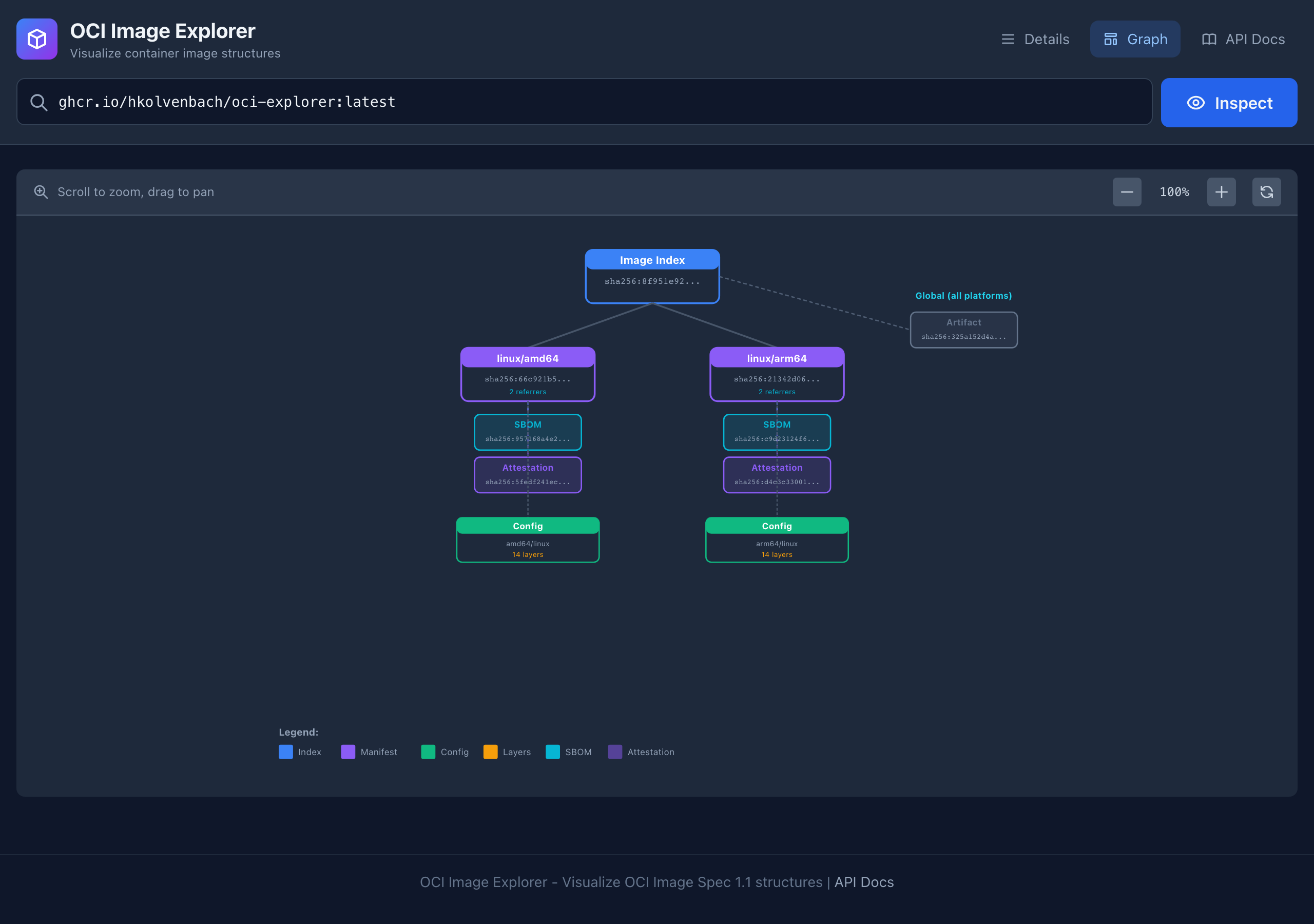
The graph view shows the full relationship tree: image index to platform manifests, referrers to specific platforms, layers stacked within each manifest. Zoom, pan, click.
How it works Link to heading
OCI Image Explorer is built in Go with google/go-containerregistry for OCI registry interaction and gorilla/mux for HTTP routing.
The core logic follows the OCI Image Spec 1.1:
- Resolve the tag to a manifest digest
- Fetch the manifest – if it’s an image index, iterate over all platform manifests
- For each platform manifest, fetch the config blob and extract layer info, build history, and runtime settings
- Query the Referrers API for each manifest digest to discover attached artifacts
- Classify each referrer by its
artifactTypeinto human-readable categories
Authentication piggybacks on Docker’s credential keychain – docker login is all you need for private registries.
The web UI, API docs, and OpenAPI spec are embedded into the Go binary via //go:embed. Single binary, zero runtime dependencies.
The bigger picture Link to heading
The standards are solid - cosign, SLSA, SPDX, CycloneDX, OpenVEX, the OCI Referrers API. But the tooling is fragmented. Each tool does its job well in isolation, but there’s no unified way to see the full picture.
OCI Image Explorer doesn’t replace any of these tools. But it gives you the missing observation layer: a single view of everything attached to an image before you start verifying individual artifacts.
Try it Link to heading
The fastest way is the public instance at ociexplorer.dev. No install, no Docker, just paste an image reference and hit Inspect.
Try these images for interesting supply chain metadata:
ghcr.io/hkolvenbach/oci-explorer:latest– signatures, SLSA provenance, SBOM, VEXcgr.dev/chainguard/nginx:latest– signatures, SBOMs, attestationsalpine:latest– minimal baseline for comparison
Or run it locally:
docker run -p 8080:8080 ghcr.io/hkolvenbach/oci-explorer:latest
# Open http://localhost:8080
The project is Apache 2.0 licensed. PRs and feedback welcome.
If you’re working with container supply chain security and have opinions about what this tool should show, I’d love to hear from you. Open an issue or find me on LinkedIn.