Just over a week ago I wrote about why I built OCI Image Explorer. The first version was a Go backend with a single embedded HTML file. Enter an image, see its layers, referrers, graph. It worked.
Then I kept using it and kept finding things that were missing.
10 releases across two weekends. The 1,757-line inline JavaScript frontend is now a Svelte 5 SPA with TypeScript and Tailwind CSS 4. Vulnerability scanning, supply chain security scoring, and matching tag discovery got added along the way.
What v0.2.0 Looked Like Link to heading
The original release had the core idea right: enter an image reference, see everything attached to it. Multi-platform image indexes, layer inspection, configuration details, build history, and OCI referrers showing signatures, SBOMs, and attestations.
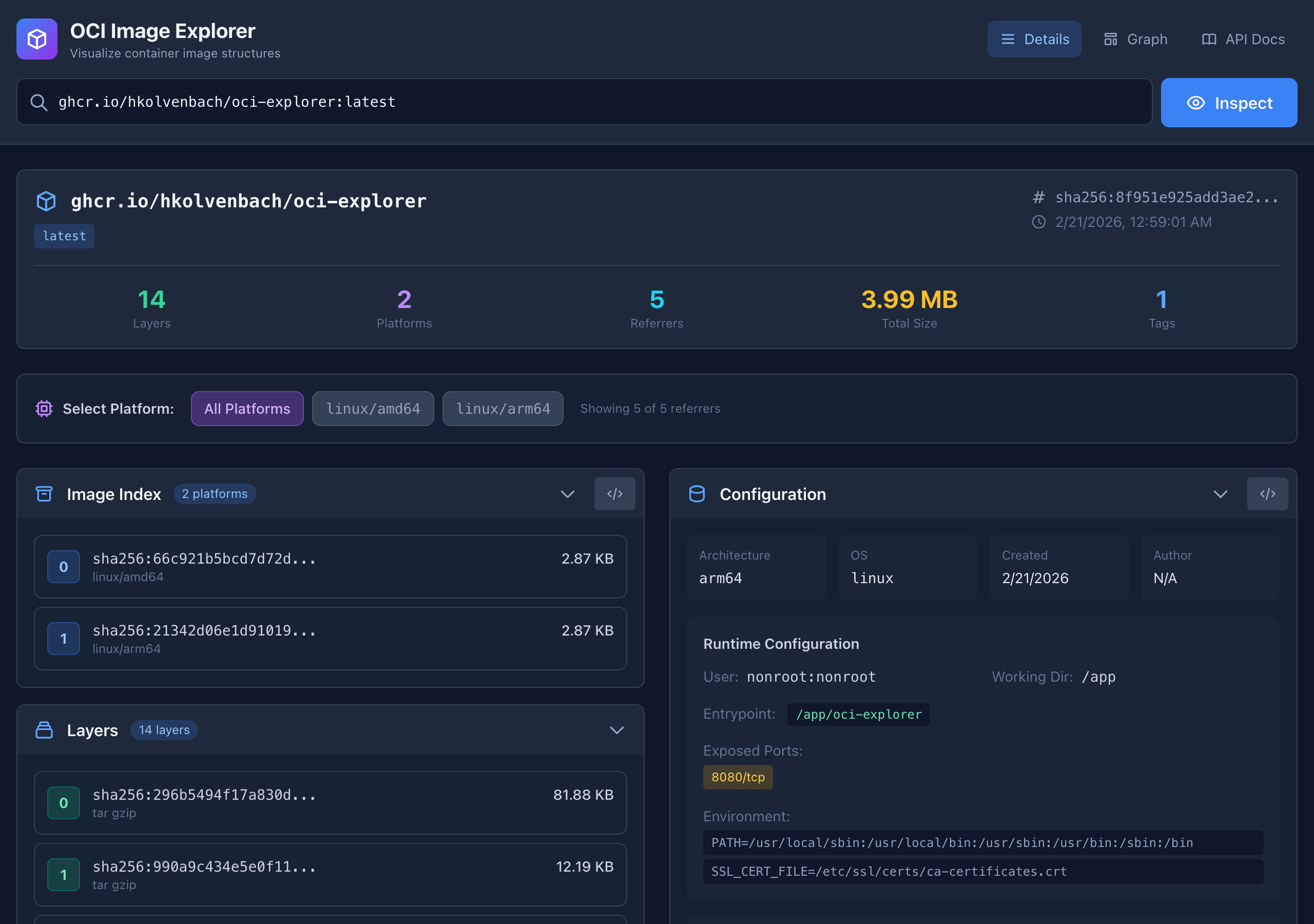
It worked. But the frontend was a single index.html file with all the JavaScript inline. Digests were long hex strings you had to manually copy. Referrers were listed without visual distinction between a signature and an SBOM. And there was no way to scan for vulnerabilities or understand whether the image was “good enough” to deploy.
What Changed Link to heading
Supply Chain Security Score Link to heading
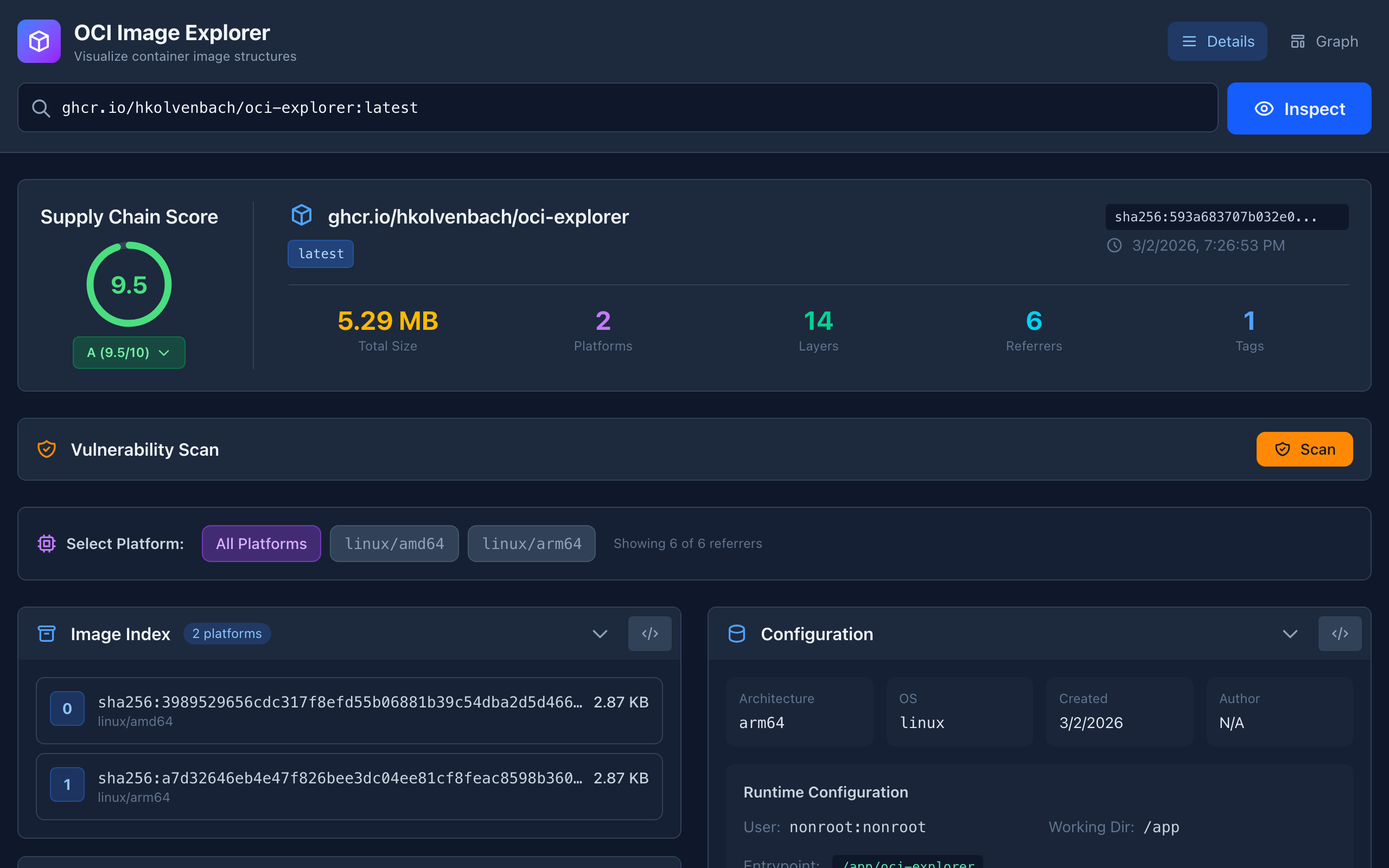
Every image now gets a 0-10 score with a letter grade.
Signatures present? SBOMs? Attestations? VEX? Minimal base image (few layers, small size, non-root user, no shell entrypoint)? Each criterion is pass/fail, expandable for details.
This is the feature I wanted most. Instead of mentally tracking “some but not all” supply chain artifacts, I look at one number and know exactly what’s missing.
Vulnerability Scanning Link to heading
v0.2.0 could show you what was attached to an image. v0.5.0 can also tell you what’s wrong with it.
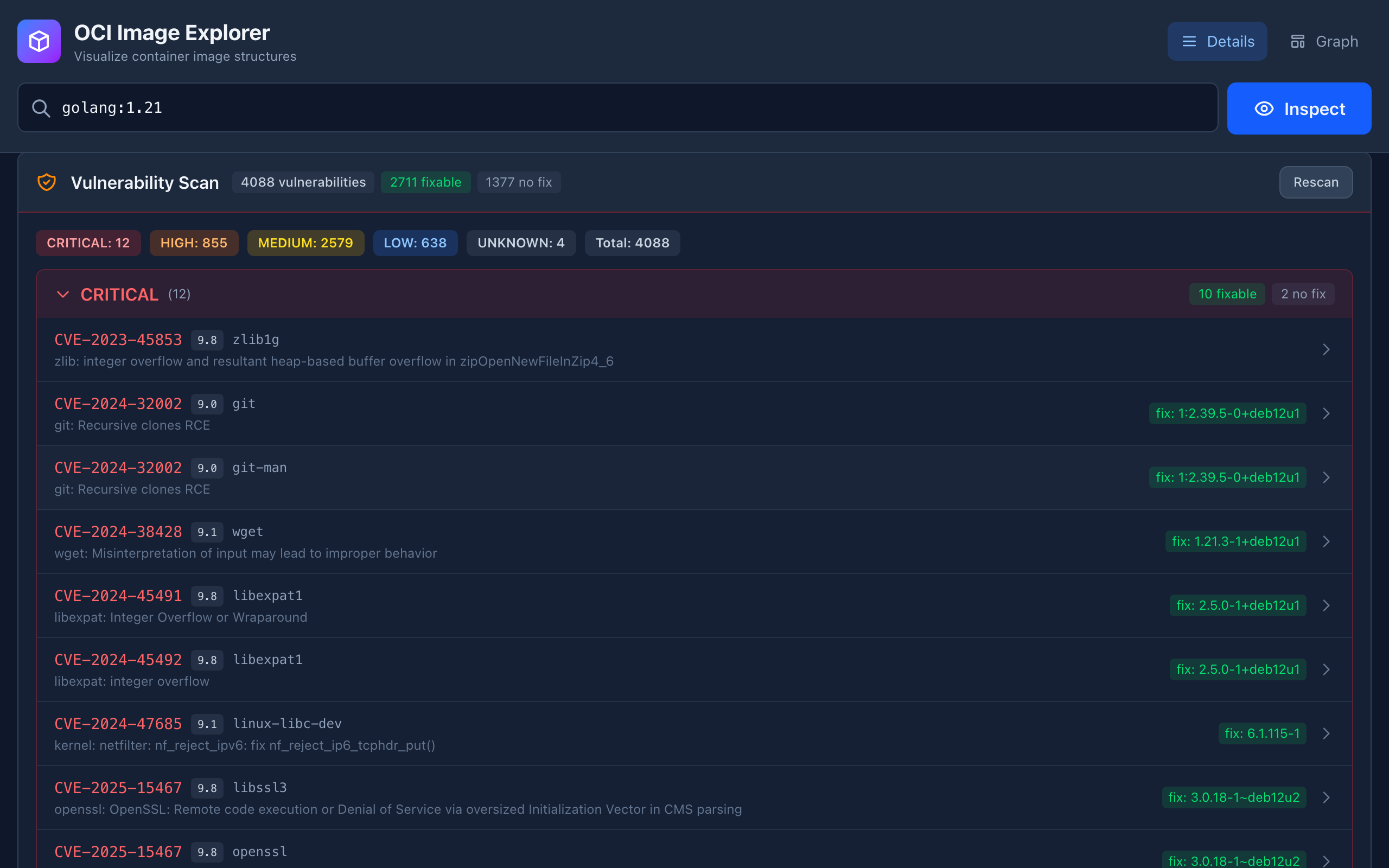
Hit the Scan button and OCI Explorer runs Trivy against the image. Results come back grouped by severity (Critical, High, Medium, Low) with CVSS scores from multiple sources - NVD, Red Hat, Debian, Ubuntu. Each CVE is expandable with package details, installed vs fixed versions, and links to advisories.
Two features make this more than just “Trivy with a UI.” First, deduplication: when the same Go stdlib vulnerability appears in 15 different binaries inside the image, you see it once with a count, not 15 times. Second, VEX cross-referencing: if the image has OpenVEX referrers attached, the scan results are automatically annotated with VEX status. A CVE marked “not affected” shows up with a chip explaining why. Trivy finds vulnerabilities, OpenVEX says which ones don’t apply, and OCI Explorer connects the two automatically because it already has both data sources.
Richer Supply Chain Artifacts Link to heading
Referrers went from a flat list to cards with distinct icons, certificate identities, and View/Download actions.
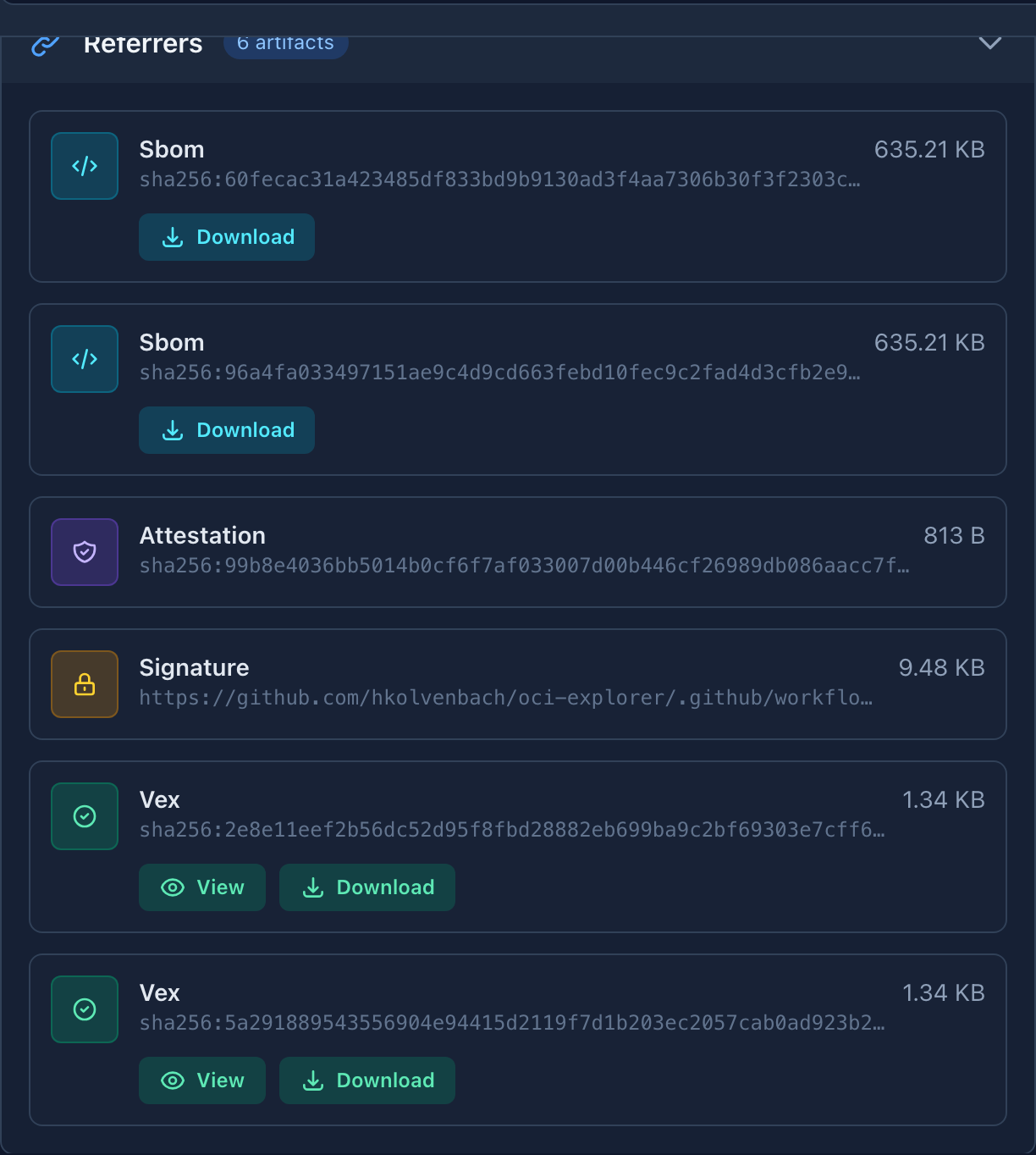
Signatures show the Sigstore certificate identity and OIDC issuer – you can see which GitHub Actions workflow signed the image without running cosign verify. SBOMs show format (CycloneDX vs SPDX) with one-click download. VEX documents show parsed statements with vulnerability status and justifications.
Compare to v0.2.0:
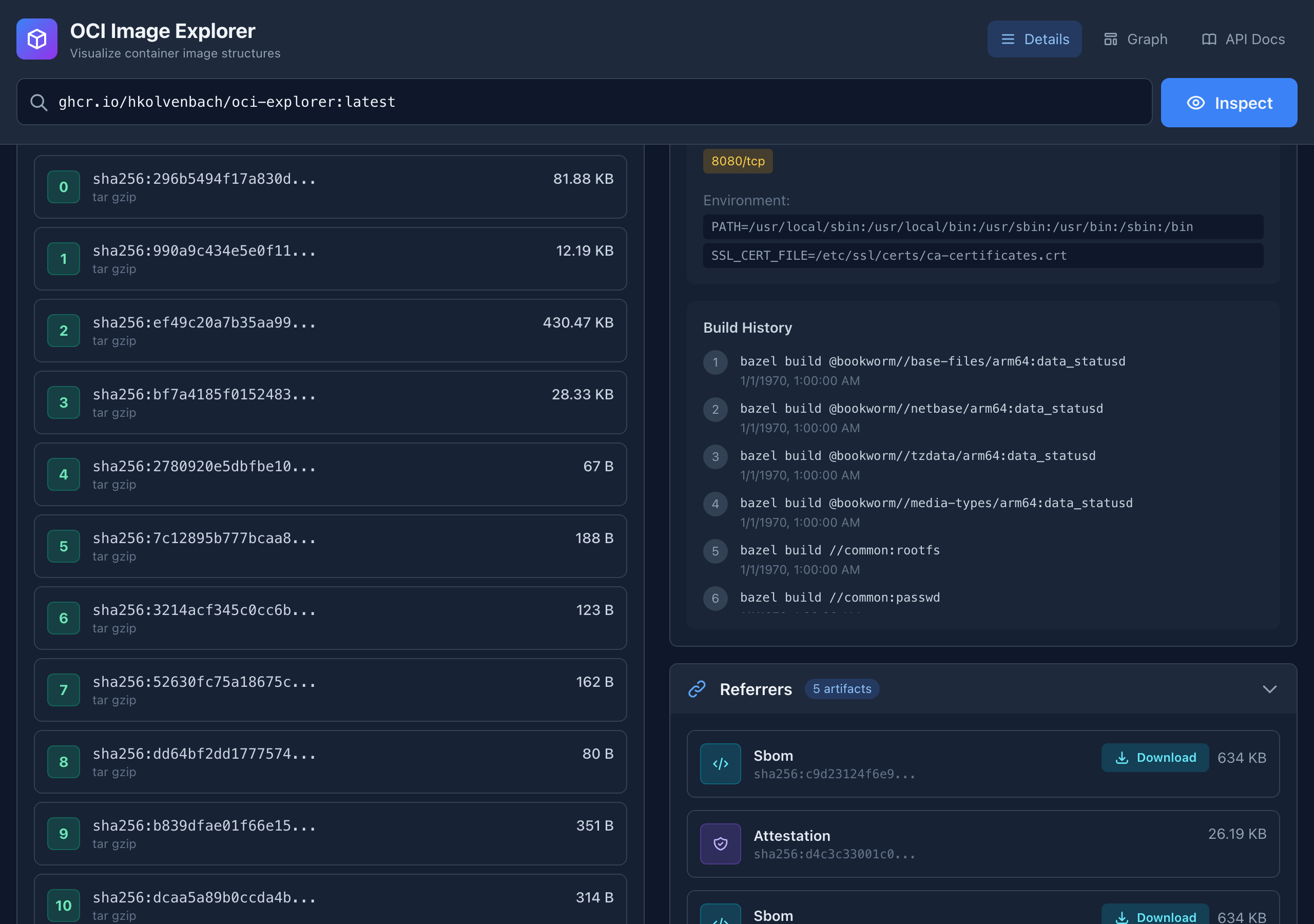
Same data. v0.5.0 just makes it readable.
Matching Tags Link to heading
Digest-to-tag reverse lookup. Small feature, saves real time.
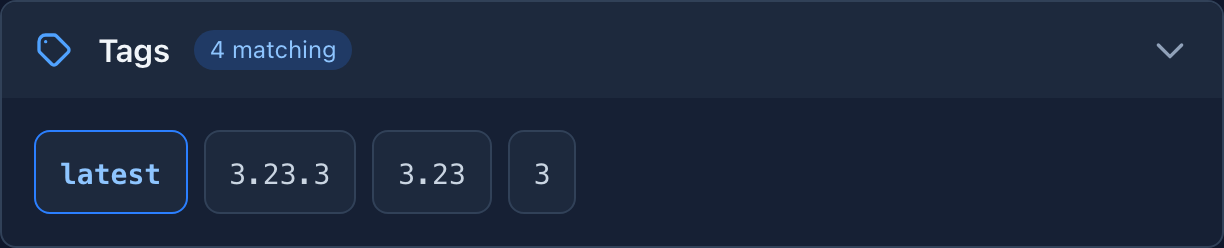
Inspect alpine:latest and see that this digest is also 3.23.3, 3.23, and 3. Vulnerability scanners and deployment manifests often reference different tags for the same image – knowing they’re identical saves a round of confusion.
Registry-aware: Docker Hub has digest filtering, GCR/Artifact Registry have their own APIs. Unsupported registries get a note instead of a broken feature.
The Svelte Rewrite Link to heading
The biggest change isn’t a feature. It’s architecture.
v0.5.0 replaced the inline JavaScript entirely with Svelte 5 and TypeScript. 22 components, typed API wrappers, reactive state management with $state and $derived runes. The ScanResults component alone is more complex than the entire v0.2.0 frontend, but it’s self-contained and testable.
The practical difference: the vulnerability scanner, VEX viewer, matching tags, and security score were all added after the rewrite, and each one was straightforward because the architecture supported it. Adding a feature means creating a .svelte component, not editing a 1,700-line file and hoping nothing breaks.
XSS protection came for free. v0.2.0 had a manual esc() function that every template string had to remember to call. Svelte auto-escapes by default. The entire class of bugs disappeared.
Design Details That Add Up Link to heading
The big features are visible in screenshots. The small design changes are what made the difference in daily use.
Copyable digests. v0.2.0: triple-click a digest, miss a character, try again. Now every digest has a copy icon on hover. Click, “Copied!” toast, done. Ten seconds saved, dozens of times per session.
Semantic color coding. v0.2.0 listed all referrers identically. v0.5.0: cyan for SBOMs, amber for signatures, violet for attestations, green for VEX. You can scan the referrers section and know what you’re looking at before reading any labels.
Security score ring. Animated SVG fill, 800ms, color-coded by threshold: green above 8, yellow above 6, orange above 4, red below. You can read the result from across the room before the number even registers.
Keyboard accessibility. Every collapsible section responds to Enter and Space. prefers-reduced-motion drops all animations to near-zero. Nobody asks for these, but they’re what makes a tool usable for everyone.
Graph view changes. The v0.5.0 graph added VEX and Signature node types to the legend and color scheme. Compare the two:
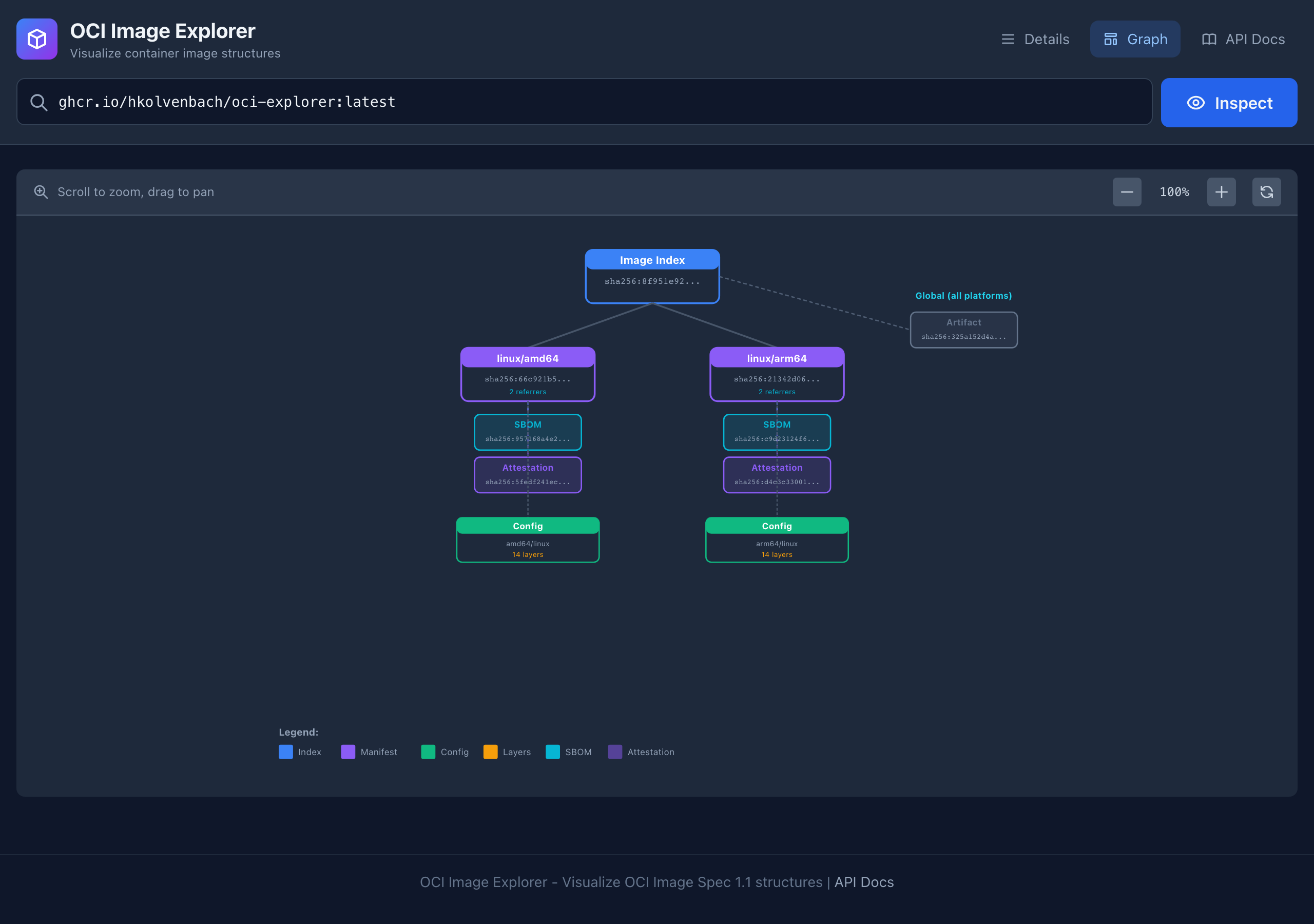
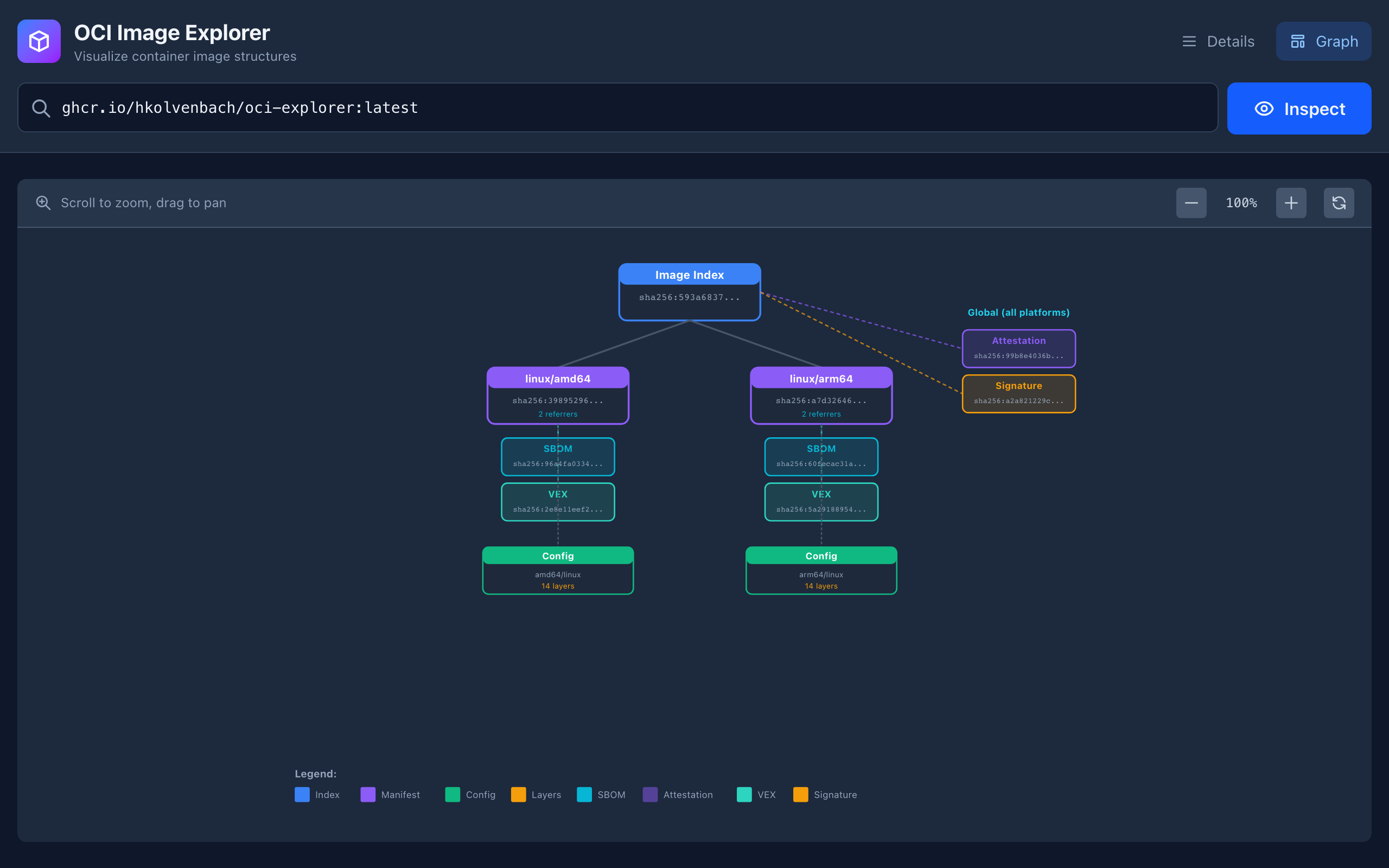
Same layout engine. v0.5.0 adds VEX and Signature node types with consistent colors across the whole UI.
Typography. Space Grotesk for the display font, monospace for digests and tags. Subtle, but dense supply chain data gets noticeably easier to parse.
What I Learned Building This Link to heading
The prototype was the spec. I didn’t write a design document for v0.5.0. The v0.2.0 prototype taught me what the tool needed to be. Every feature in v0.5.0 came from using v0.2.0 myself and noticing what was missing or awkward.
Rewrite early or don’t rewrite at all. The vanilla JS frontend would have survived another feature or two. But the vulnerability scanner was complex enough that bolting it on would have created something unmaintainable. Rewriting at v0.5.0, before the codebase got truly large, was the right call.
Supply chain tools need to compose, not just display. The most valuable feature isn’t any single view - it’s the VEX cross-referencing in scan results. It connects two independent data sources and produces an insight neither can provide alone. The next interesting features will be more of this: combining what the tool already knows.
Try v0.5.0 Link to heading
The public instance is live at ociexplorer.dev. Try scanning golang:1.21 for a dramatic vulnerability count, or inspect cgr.dev/chainguard/nginx:latest for a clean supply chain example.
Or run it locally:
docker run -p 8080:8080 ghcr.io/hkolvenbach/oci-explorer:latest
The project is Apache 2.0 licensed on GitHub. Issues and PRs welcome.
This is the second post about OCI Image Explorer. The first, Why I Built OCI Image Explorer, covers the problem space and the 7-tool, 15-command gauntlet that motivated the project.